Flight DayFlight Day

Features

What Flight Day does today

Everything below exists in the current builds. Where a device doesn’t have a feature yet, the line under it says so. Plans live on the roadmap.

Night · launch alarm

Wake and sleep

A countdown you actually want to wake up to, and a bedroom that stays dark the rest of the night.

  • Launch alarmA countdown scene while the screen and lights rise, liftoff at your wake time, then the morning briefing.Every device
  • Snooze 10 min · I’m up · Scrub · −1 min · Launch nowScrub is a deliberate hold, so you can’t cancel the morning by accident. Snoozed screens show the new liftoff time and snoozes left. A “must be up by” limit caps the snoozing.Every device · TV remote: Back snoozes
  • Back to bedReturns only the bedroom to night, until noon.Every device
  • Sleep scheduleMon–Fri, Saturday and Sunday groups, custom days and a separate tomorrow-only change. Bedtime is a target; it never starts anything by itself.Wall · TV · iPhone · iPad · Mac. Tomorrow-only change on Apple: in flight
  • GoodnightOne tap starts a sleep sound on the bedroom speaker, sets its volume and turns the screens dark. Tonight shows exactly what Goodnight will do.Every device
  • Night screenPure black, or a dim red night clock. Touch or a button shows the time and quiet controls for ten seconds: wake time, alarm, sound and this screen. Labels and values only.Wall · TV · iPad · Apple TV. On iPad and Apple TV the overlay is read-only
  • Last night and the last seven morningsWhen you went to bed against your target, and when you got up.Wall · TV · iPhone · iPad · Mac
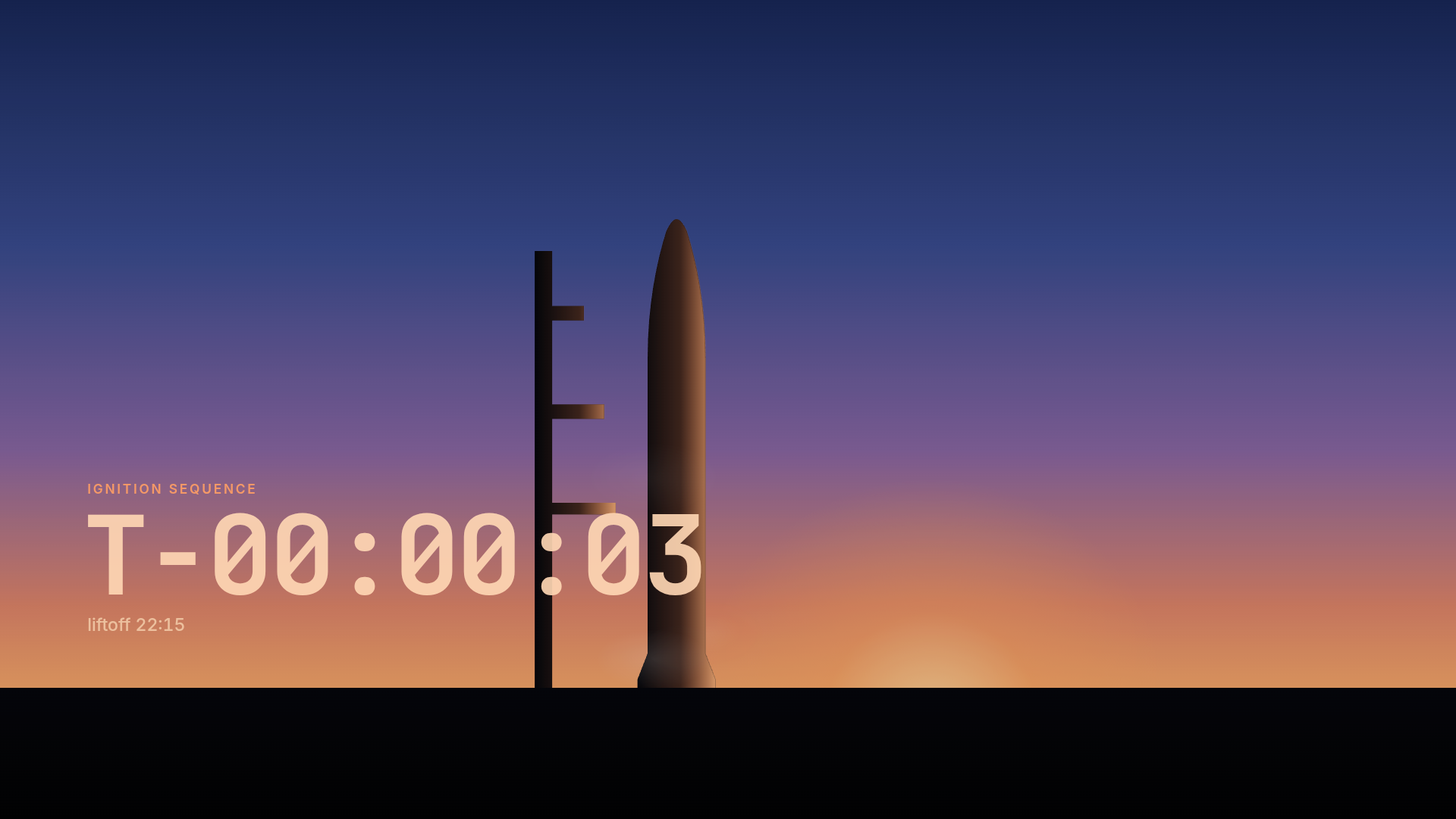
Wall panel ignition sequence: T-minus three seconds against a dawn sky, a rocket and tower in silhouette.
Wall panel · ignition sequenceReal

Home · briefing

Home and the morning briefing

The day at a glance, in numbers rather than adjectives.

  • Launch controlThe clock, the next event and the leading launch with its T-minus. A LIVE banner appears while something is flying, with a Watch button.Every device
  • WeatherNow, a one-line summary, 12 hours of rain chance, sunrise and sunset. Each section names its source: AccuWeather, Apple Weather or Open-Meteo as the free fallback.Every device · Apple TV shows weather in the briefing
  • Rain soonA next-hour rain line from Apple Weather, with Open-Meteo as the backup. Quiet in the bedroom at night.Wall · TV · iPhone · iPad · Mac · Apple TV
  • Today and what’s dueCalendar events and coursework deadlines. On the wall and TVs, Today leads with tomorrow from 8 PM.Wall · TV · iPhone · iPad · Mac
  • Morning briefingWeather and alerts, a picture, today, what’s due, space, news, last night and plan limits. On the wall and TVs it stays until Done, or two hours by default.Every device · Watch shows a glance
  • Arrange HomeLong-press a tile to reorder or hide it.Wall · TV · iPhone · iPad · Mac
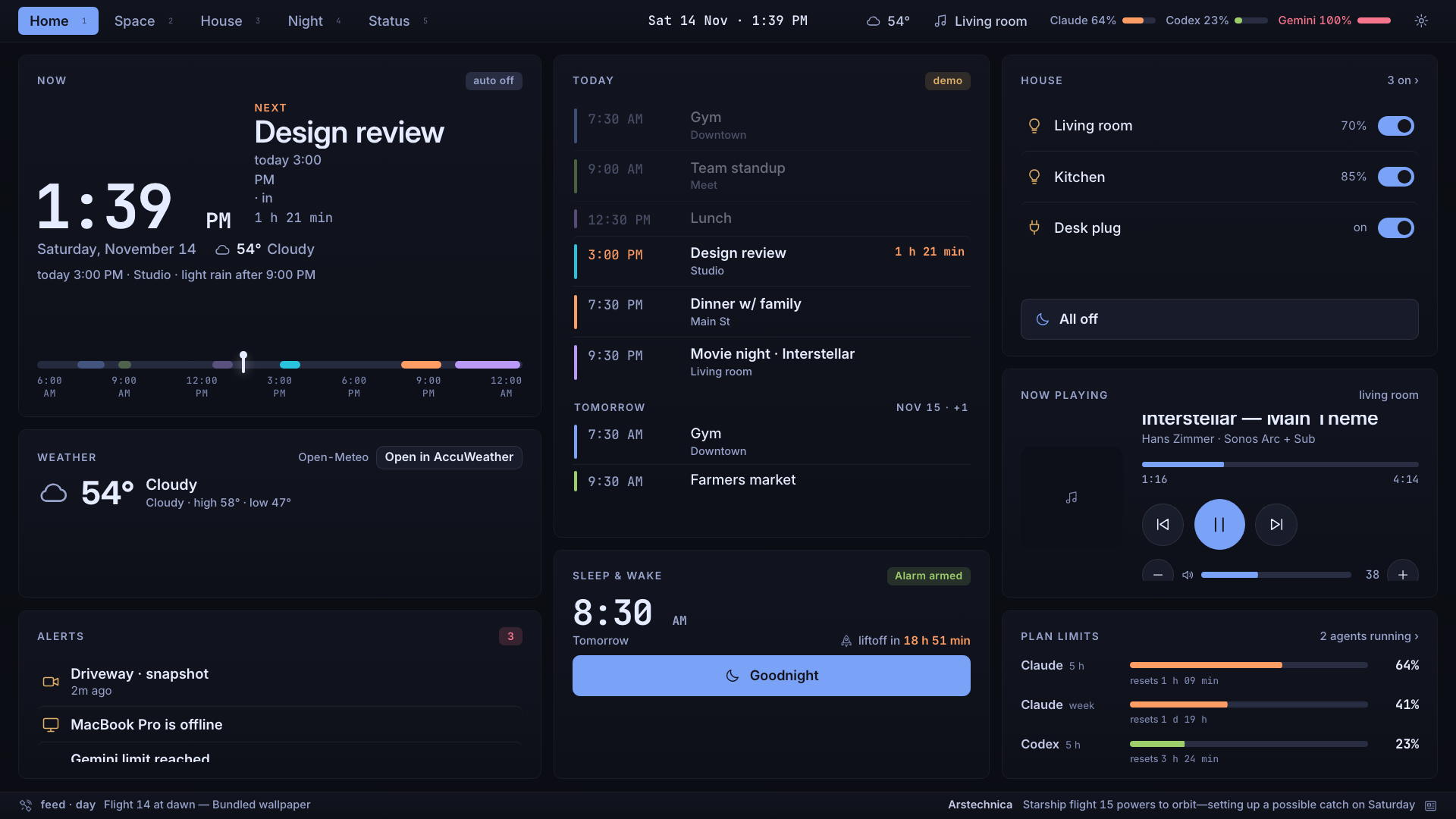
Wall panel Home with sample data: clock and next event, today's calendar, weather, alerts, house lights, now playing, sleep and wake, plan limits.
Wall panel · HomeSample data

Space

Every launch, on a live globe

Public launch data, shown plainly. Status comes from the launch itself, never from a theme.

  • Launch manifestUpcoming launches with T-minus, status and your mission priorities. Pick one and the globe flies to its pad.Wall · TV · iPhone · iPad · Mac · Apple TV
  • GlobeThe ISS with its past and predicted track, launch pads, day and night, and a flat-map fallback.Wall · TV · iPhone · iPad · Mac · Apple TV
  • Next ISS pass and LOOK UPWhen the station next passes over you, how high and for how long. During a visible pass, a LOOK UP card appears.Next pass: every device · LOOK UP: every screen with Ambient or a night overlay
  • Visible from homeLaunches close enough to see, with the direction to look and any landing or sonic-boom note.Every device
  • Flight DirectorT-minus, the mission timeline and vehicle, estimated altitude and speed for the first nine minutes, the pad forecast for T-0, then a switch to the stream.Wall · TV · iPhone · iPad · Mac · Apple TV
  • Crew, events and newsWho’s in space, upcoming landings, dockings and flybys, and space news.Crew and news: wall, TV and Apple · Events: wall and TV
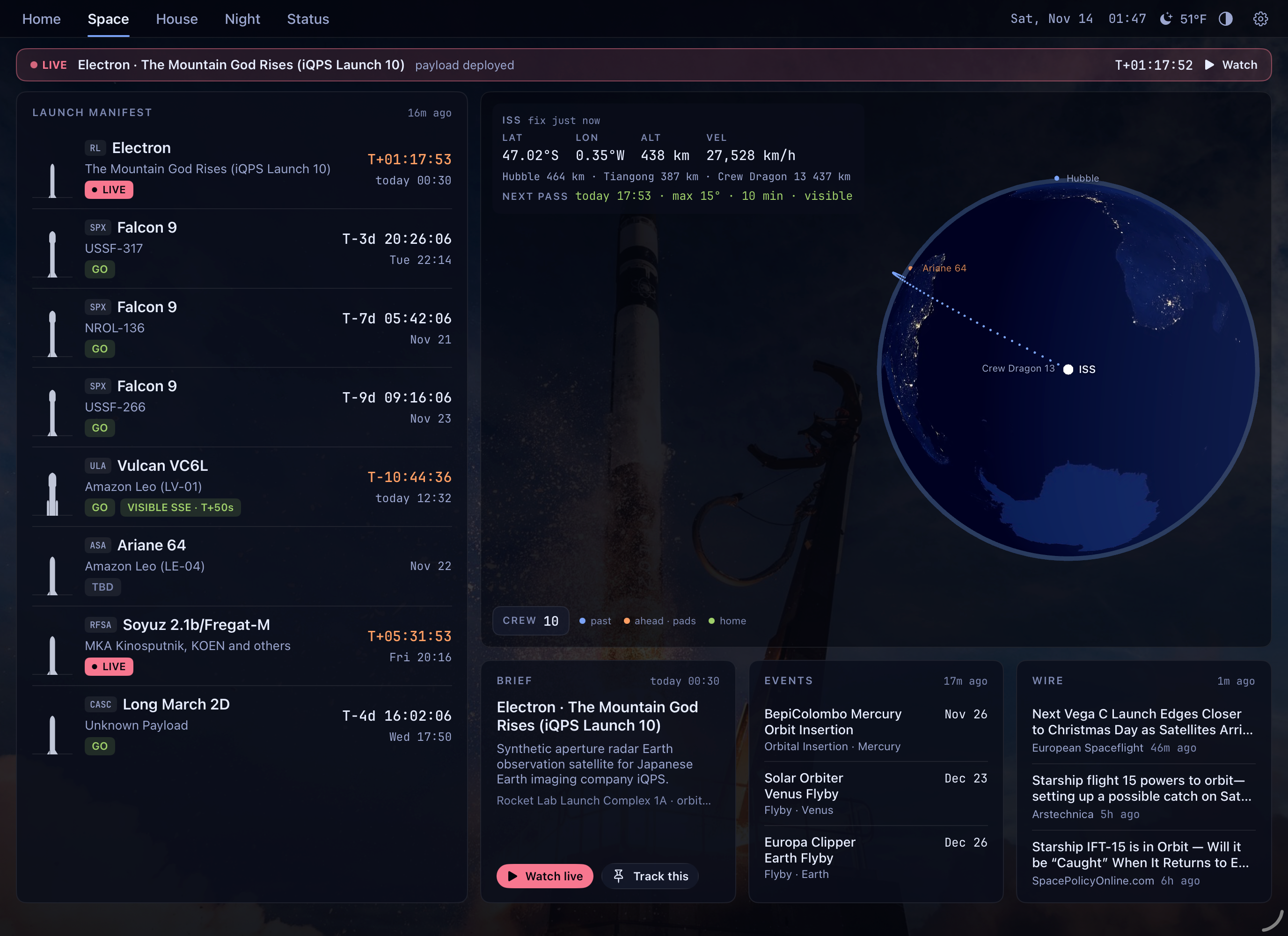
iPad Space in landscape: launch manifest, ISS telemetry and next pass, a globe, the launch brief, events and news.
iPad · SpaceReal

House

House and Smart Comfort

Home Assistant does the work. Flight Day shows what it reports, word for word, and asks before it guesses.

  • Smart ComfortAuto, Heat, Cool or Off, manual adjustments, Fresh air and Close up, and holds with Resume. Off stays off until you resume it. Automatic mode is watching in shadow before it takes control.Every device · Watch shows status and actions
  • Comfort scheduleNight, Wake and Day temperatures and the time Day starts, edited from any screen.Every device but Watch
  • Rooms and AI planRoom readings with their age, and an AI comfort plan with its reasons and a Skip today. Both show an honest standby until their data arrives.Every device but Watch
  • Lights and scenesLights, All on and All off, and Home Assistant scenes and scripts. On the wall and TVs, light controls keep the warmest colour the bulb supports.Every device
  • MediaWhat’s playing with transport and volume, TVs and speakers with their state.Every device but Watch
  • CamerasThe still from each camera’s last event. Live video on tap on Apple devices.Wall · TV · iPhone · iPad · Mac · Apple TV
  • Robot vacuumStatus, battery, map and rooms, Start, Pause and Dock, and maintenance items that are due.Wall · TV · iPhone · iPad · Mac · Apple TV
  • ThermostatCurrent temperature and setpoint, Off, Heat or Cool, and − / +.Wall · TV. Apple: next
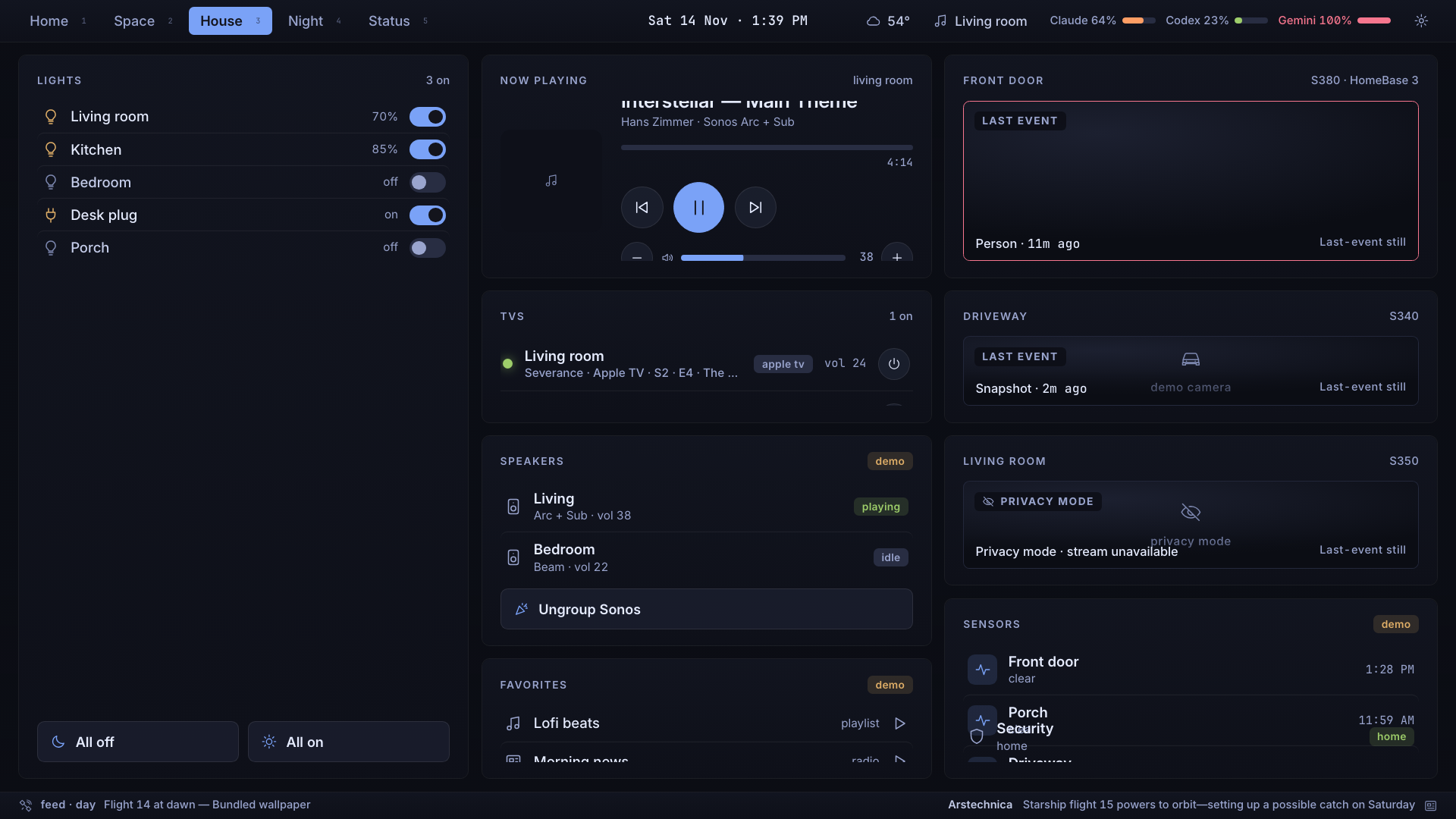
Wall panel House with sample data: lights, now playing, TVs, speakers, favourites, camera stills and sensors.
Wall panel · HouseSample data

Status · ambient

Status and ambient

What’s connected, what’s stale, and a quiet screen when nobody’s looking.

  • Stale data says soAnything old dims and says “as of 6:10 AM”. Missing data says what’s missing.Every device
  • Plan limitsHow much of your AI plans is left this week and when each resets.Every device
  • IntegrationsEach source with “Not connected: …” when it isn’t, and a link to the setting that fixes it.Wall · TV. Apple: partial
  • AmbientAfter a few idle minutes: the clock, date, temperature, next event and wake time over a still, animated or live picture, with its credit. Near a launch, Flight Director takes over.Wall · TV · iPad · Mac · Apple TV · iPhone on demand
  • This screenName, areas, Home tiles, theme, ambient, night look and brightness for each screen, and the shared 12-hour, 24-hour or both time format.Every device but Watch
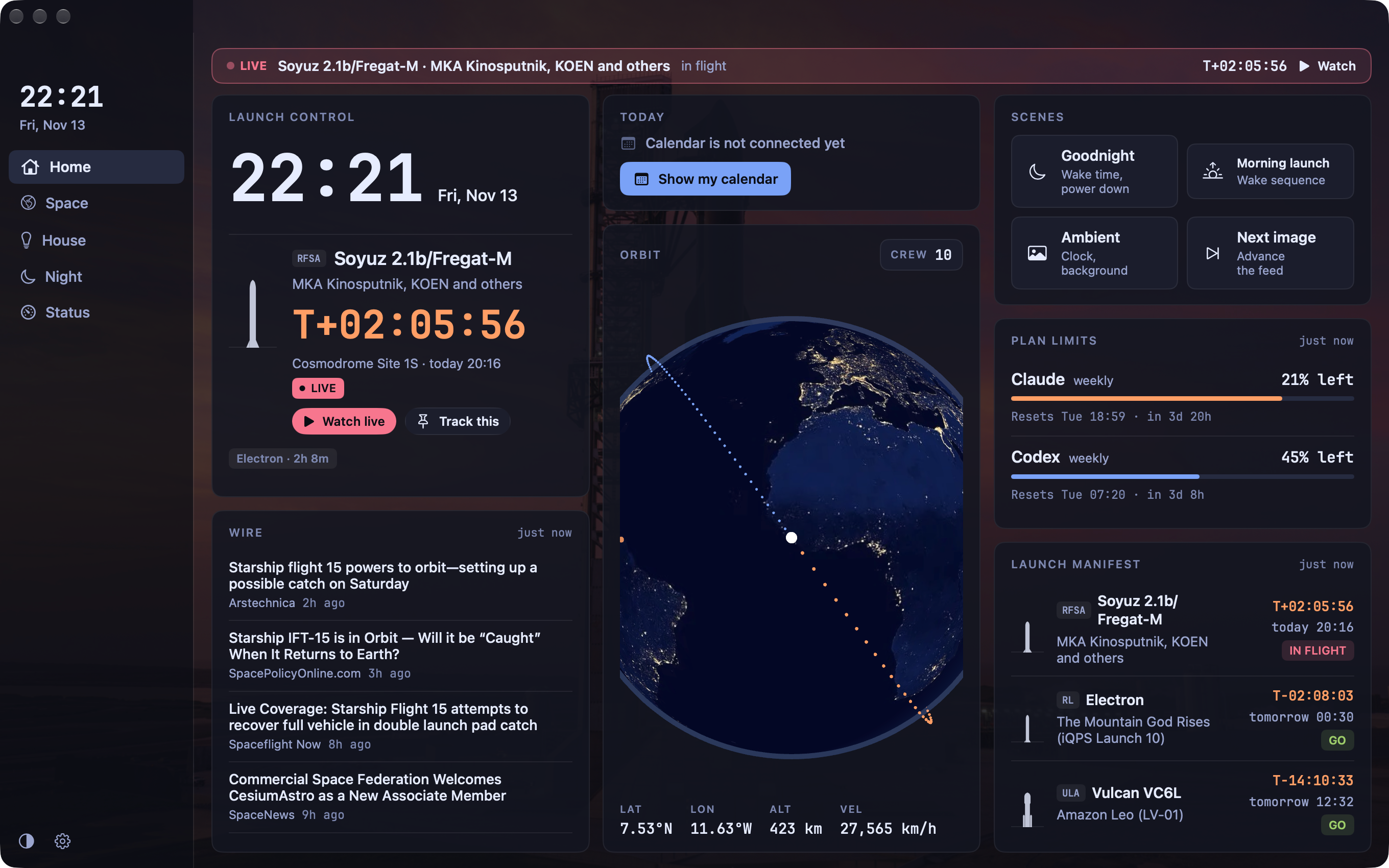
Mac Home: sidebar, Launch control with a live launch, orbit globe, scenes, plan limits and the manifest.
Mac · HomeReal

Apple extras · TestFlight beta

Only on Apple, by design

The Apple apps are native and use what each platform does best. They’re a TestFlight beta; there’s no App Store release date.

iPhone

Alarm notifications with Snooze, I’m up and Scrub, Live Activities, Lock Screen and Home Screen widgets, Control Center, Siri and Shortcuts.


Apple Watch

The alarm on your wrist, double tap to snooze, complications, and an offline “as of” mode.

Mac

A sidebar dashboard and a menu-bar countdown.

Apple TV

Top Shelf, Siri Remote alarm controls, YouTube hand-off for launch streams, offline “as of” mode.

House rules

What every build follows

Nothing on the wall is fake

A tile shows real data or a standby that says what it’s waiting for. Sample content appears only in demo mode, and it’s labelled.

Night is quiet

Red and amber on black, no brand colours, nothing visible or audible on bedroom screens at night unless you ask.

Warm light only

No routine sets white light.

Readable and calm

Text meets 4.5:1 contrast (the deliberately dim night clock aside) and Reduce Motion is respected everywhere.